
The Best CS2 Viewmodel Settings for Competitive Play
In Counter-Strike 2, every small visual tweak can give you a competitive edge – and one of the most underrated settings to optimize is your viewmodel.
The viewmodel defines how your weapon appears on the screen: its position, tilt, and overall visibility.
While it doesn’t directly affect your aim or hitboxes, a properly adjusted viewmodel can drastically improve visibility, reduce distractions, and make your game feel smoother.
Here’s how to set up yours for the best competitive experience.
What the Viewmodel Does
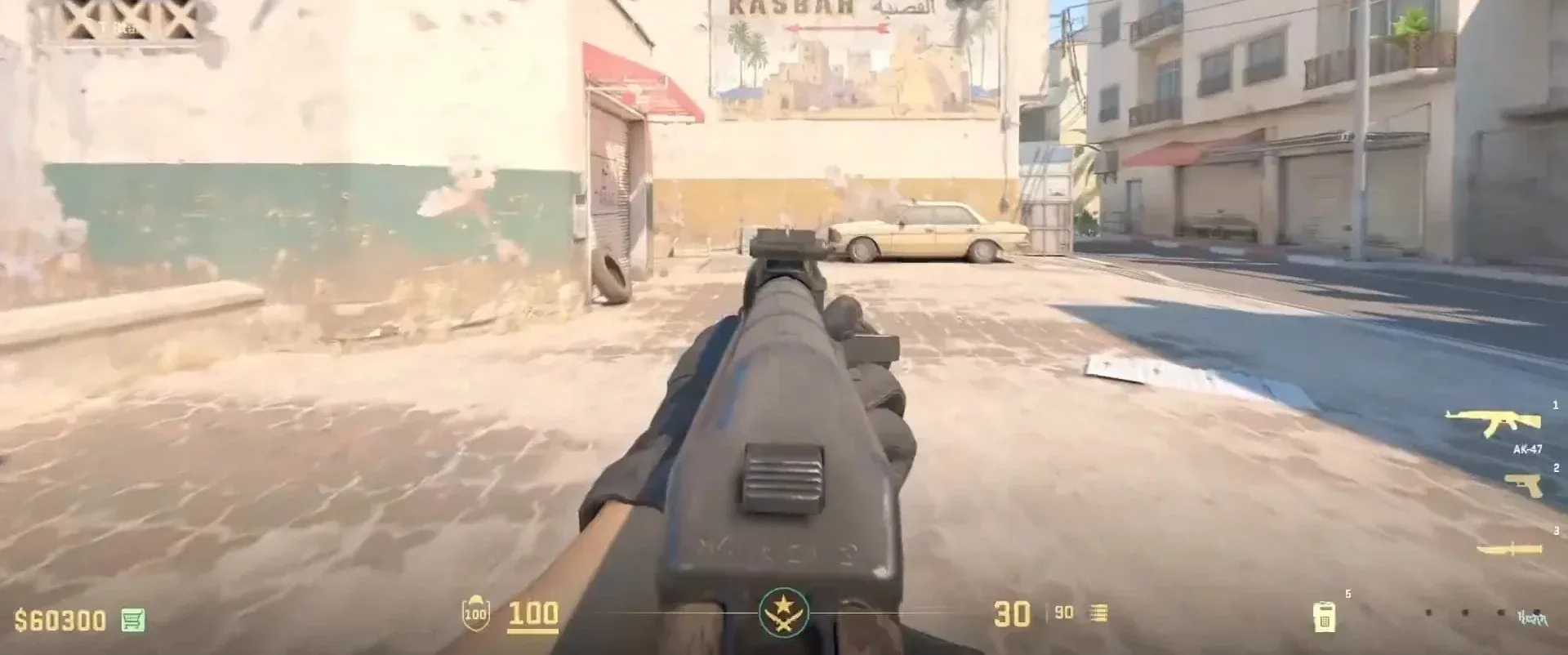
The viewmodel controls where your weapon sits on the screen. It affects:
- How much of your screen is visible (less weapon = more visibility)
- How close or far your gun appears (which can affect your perception of aim)
- Which hand holds the weapon (left or right side of the screen)
In short, the right viewmodel gives you a clear, distraction-free view without making your weapon feel awkward or unnatural.
How to Change Viewmodel Settings
You can adjust your viewmodel through the developer console or via in-game settings.
To change through settings:
- Open Settings > Game > Item
There, you can change the viewmodel position in two ways - Desktop or Classic.
- Desktop positions the weapon slightly higher in the lower right corner.
- Classic places the weapon lower in the same corner.
Also, you can change the handedness of your agent (left or right).
To change through the console:
- Settings -> Game -> Enable Developer Console (Yes)
In the console, you can do much more than slightly change the viewmodel and handedness.
- viewmodel_presetpos 1/2 - Changes the viewmodel. 1 = Desktop, 2 = Classic.
- viewmodel_fov 60 – 70 - Adjusts the field of view for your weapon.
- viewmodel_offset_x -2,5 – 2.5 - Moves your weapon horizontally (left or right).
- viewmodel_offset_y -2 – 2 - Moves your weapon vertically (up or down).
- viewmodel_offset_z -2 – 2 - Controls the weapon's depth (closer or farther).
Now that we've discussed the necessary commands, let's review some of the best combos that will improve your gameplay.
Recommended Competitive Viewmodel Settings
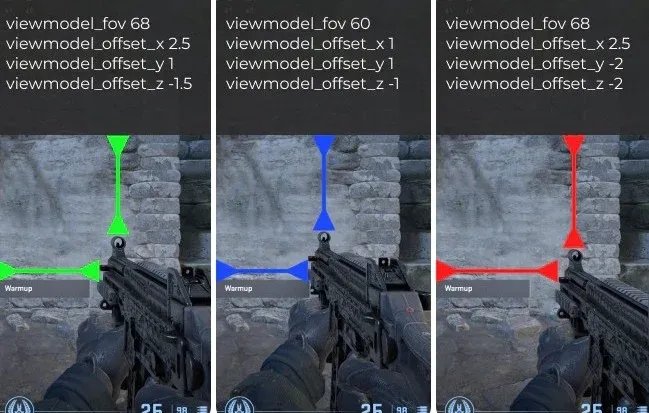
These viewmodel settings are widely considered optimal for most players:
- viewmodel_fov 68
- viewmodel_offset_x 2.5
- viewmodel_offset_y 1
- viewmodel_offset_z -1.5
This setup is clean, balanced, and suitable for all playstyles – from riflers to AWPers.
Maximum Visibility Setup
If you want maximum screen visibility and minimal distraction, try this alternative:
- viewmodel_fov 60
- viewmodel_offset_x 2
- viewmodel_offset_y 1
- viewmodel_offset_z -2
This version pushes the weapon lower and slightly farther away, freeing more of your screen and keeping focus strictly on the crosshair.
Pro Players' Viewmodels
If these versions don't feel right for you, try using the ones that professional players use.
ZywOo / donk / dev1ce
- viewmodel_fov 68
- viewmodel_offset_x 2.5
- viewmodel_offset_y 0
- viewmodel_offset_z -1.5
- viewmodel_presetpos 2
NiKo
- viewmodel_fov 64
- viewmodel_offset_x 1
- viewmodel_offset_y 2
- viewmodel_offset_z -1.5
- viewmodel_presetpos 2
Xantares
- viewmodel_fov 60
- viewmodel_offset_x 1
- viewmodel_offset_y 1
- viewmodel_offset_z -1
- viewmodel_presetpos 1
Last Words
Your viewmodel doesn’t make you aim better – but it makes it easier to see, react, and stay focused, which directly improves performance.
The best CS2 viewmodel settings are the ones that give you a clear view of your surroundings without pulling attention away from your crosshair.
Start with the competitive setup above, adjust until it feels natural, and you’ll notice smoother gameplay and better awareness in every match.