
CS:GO Bot Commands (Updated for CS2)
One of the best ways to improve your aim, learn to use your grenades, and understand the game is by using bot commands. If you want to work on your spray, learn maps, or try out smoke lineups, knowing how to control bots gives you lots of freedom.
In this guide, you will learn about how to add, kick, and manage bots in CS2, adjust their difficulty, and create the perfect training structure simply through console commands.
Before starting to use commands, you need to check if the Developer Console is turned on (and for that you need to press "~"). If nothing shows out there, here’s how to turn on the Developer Console in the game:
1. Start the game up.
2. Head to the settings menu.
3. Click on the “Game” tab.
4. Look for the “Enable Developer Console (~)” option.
5. Switch that to “Yes”.
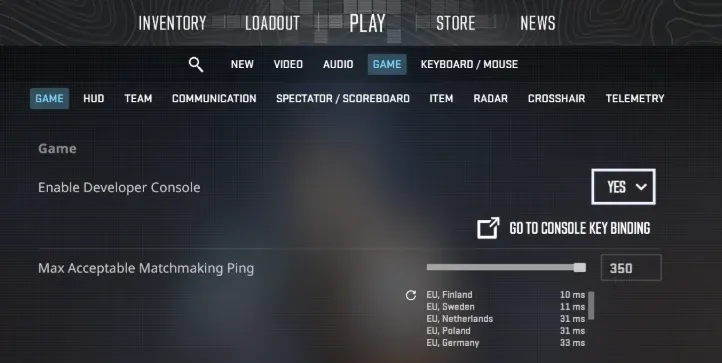
Now, after you have done those actions, you can use the Developer Console.
After you select the map you want to train on, you can adjust it immediately from the main game menu; however, there are not many options.
Once you enter the map, you should enter sv_cheats 1 in the console. If bots are not present, you can start adding and removing them.
How to Add Bots?
To add bots to your training map, you should type these commands:
- bot_add_ct - which adds a bot to the Counter-Terrorist team
- bot_add_t - adds bot to the Terrorist team
- bot _add - adds a bot randomly to one of the two teams
If your goal is to have bots only in the opponent's team to train against, use the command mp_autoteambalance 0. This command doesn’t allow bots to switch teams to balance teams.
How to Kick Bots?
If you need to get rid of the bots, you can kick them all by using one command - bot_kick. After using it, all bots will be removed from the map.
If you want to remove a certain bot from the game, you can just kill it with bot_kill <bot_name>. But if you want to eliminate bots from only one team, you need to use:
- bot_kill t - to kill all Terrorist bots
- bot_kill ct - to kill all Counter-Terrorist bots
How to Control Bots?
Moreover, there are also bot behavior controlling commands that allow you to make bots play only with snipers or make them stay still. Here are the commands to manage bots in CS2:
- mp_free_armor 2 - makes all bots have both armor and helmet
- mp_free_armor 1 / mp_max_armor 1 - makes bots buy only body armor, but no helmet
- bot_crouch 0/1 - bots can crouch
- bot_all_weapons - allows bots to use any weapon they want
- bot_knives/ pistols/snipers_only 0/1 - restricts bots to knives, pistols, or sniper rifles.
- bot_stop 0/1 - stops the bot's movement, shooting, or any other action
- bot_place - allows you to place bots where your crosshair is located
- bot_dont_shoot 0/1 - prevents bots from shooting, but they can walk
With these commands, you can improve your aim, learn smoke lineups, and much.
How to Change Bot Difficulty in CS2?
One of the most important commands to train is the bot's difficulty-regulating commands. They allow players to make bots play better/worse by using a command.
To regulate difficulty in CS2, use these console commands:
- bot_difficulty 0: This command makes bots absolutely harmless; they don’t shoot you, just walk. It is a beneficial command for players who want to improve their aiming.
- bot_difficulty 1: Level 1 makes bots slightly harmful; they can shoot, but their reaction is slow, which gives you time to kill them noscope or perform any other acrobatic move.
- bot_difficulty 2: Now, at this level, bots have basic movement and tactics knowledge; they still don’t do much damage unless you give them that opportunity. They are still boring to play, as with level 0 or 1 bots.
- bot_difficulty 3: Bots can throw nades and headshot you easily. Not a challenging level, however, not an easy level either.
- bot_difficulty 4: At this level, bots have better grenade throws, which do good damage. Moreover, now they use covers and have a quick reaction like normal players. So, you'd better stay focused.
- bot_difficulty 5: Hardest bot level available in the game. Bots can one-tap you with AWP or just headshot you. If you are not prepared for such pain, you'd better stay away from that level.