
CS2 Sound Settings Every Competitive Player Should Use
While your aim may win your duels, attentiveness to sounds will give you the competitive edge you need to not feel vulnerable. Similarly, failing to optimize your sounds will make your fights harder to win.
Whether you hear a step or the sound of pulling the pin from a grenade, sounds will help you catch your enemies off guard, or spot their position.
This article will show you the best CS2 audio settings to use to improve your gameplay.
Sound Settings In CS2
Although CS2 supports gameplay without headphones, using them can help you notice all the sounds better. They get mixed before coming out of a speaker, and no one can distinguish the direction of a sound. But a headphone redirects sound to the correct side, giving you some idea of your enemy's location.
CS2 headphone settings include several categories - Audio, Voice, Music, and Game Mode EQ.
CS2 Audio Settings
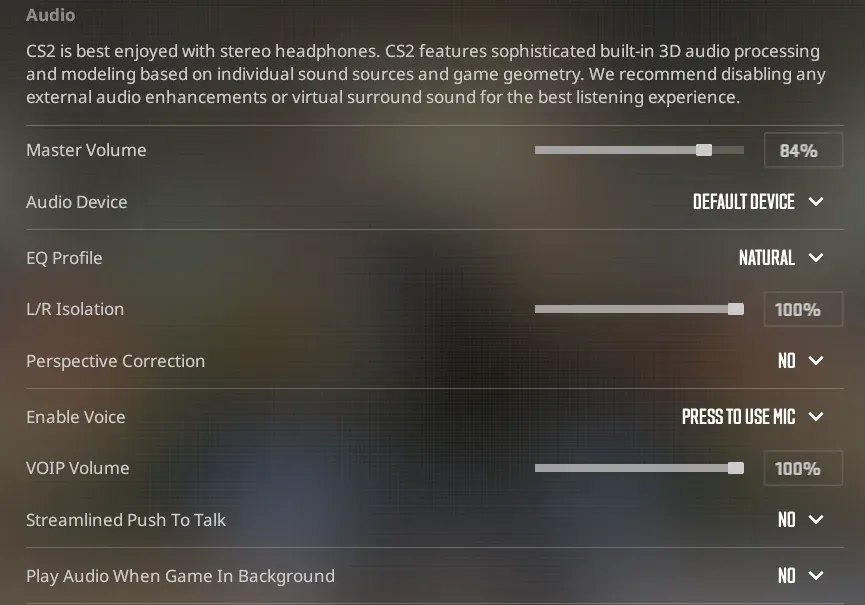
Here are all the optimized audio settings.
- Master Volume: 80% - 100%
- Audio Device: Default Device
- EQ Profile: Crisp
- L/R Isolation: 50% - 60%
- Perspective Correction: Disabled
- Enable Voice: Press To Use Mic
- VOIP (Voice over Internet Protocol) Volume: 45%
- Streamlined Push-To-Talk: Yes
- Play Audio When Game In Background: No
These settings isolate the steps and sounds, making it obvious from what direction they come. Try using them in your games, and you'll notice how easy you find your enemies.
CS2 Voice Settings
Another communication method is the voice chat, which allows players to speak to each other in real time. However, sometimes the voice of your teammates can distract you. That's why we suggest asking your teammates to speak more quietly or to lower their volume.
Here's how you can balance the voice chat settings:
- Other Player Voice Volume: 80% (Optional)
- Voice/Microphone Mode: Push-to-Talk
- Voice Input Audio Device: Default Device
- Hear My Own Voice: Off
- Streamlined Push To Talk: No
- Microphone Trigger Threshold: -100
Optimizing the way you and your teams communicate will help cover the gaps in your gameplay.
CS2 Music Settings
When it comes to music settings, it's not that simple. You need to find a comfortable level of volume for each music line - one that will not distract you, but will still let you enjoy your music kit.
We suggest keeping the music levels low during the rounds, as they might distract you from hearing steps both before and after your death.
Here is how to optimize the music settings:
- Main Menu Music Volume: 20%
- Round Start Volume: 20%
- Round Action Volume: 10% - 20%
- Round End Volume: 10% - 20%
- MVP Volume: 50%
- Bomb/ Hostage Volume: 50% - 60%
- Ten Second Warning Volume: 50% - 60%
- Death Camera Volume: 20%
Some of these sounds can provide important clues mid-round. You might be busy fighting off the enemy team and not pay attention to the time. The ten-second warning volume will serve as a warning that the round is near the end. Then, you might choose to save, fight for the round, or hide until the explosion.
CS2 Game Mode EQ
Also, there are some equalizer settings, which can help create a custom-tailored, in-game sound. But, in contrast to the previous setting categories, the EQ settings are custom for each mode you play.
- Competitive EQ: Default
- Casual EQ: Default
- Deathmatch EQ: Default
- Arms Race EQ: Default
The default settings are good by themselves, so, unless you want a custom approach to it, you can leave it at the default.
Console Commands for Audio Settings in CS2
Along with the in-game settings, there are some console commands that will give you a competitive edge.
- snd_mixahead 0.05 - Lowers the audio delay so sounds play closer to real time. This makes cues like footsteps feel more immediate, helping you react faster.
- snd_headphone_pan_exponent 2 - Enhances directional audio, making it easier to understand where sounds are coming from, especially at longer distances.
- snd_front_headphone_position 45.0 and snd_rear_headphone_position 135.0: They adjust the positioning of front and rear audio to sharpen your perception of footsteps and other key in-game sounds from different directions.
With these console commands, you’ll notice audio cues more clearly.
Last Words
Mastering every aspect of Counter-Strike is important in the journey of becoming a great player. Aim, movement, map knowledge, and much more are necessary to climb the ladder of ranks.
If you want to become better, follow our guides, practice daily, and don't forget that becoming a good player doesn't only mean having precise aim. Sound plays a crucial role in gaining a competitive edge. Dial in your audio settings now, and you’ll immediately feel the difference in your overall awareness and performance.
FAQ
Is Using CS2 Sound ESP Allowed?
No, using sound ESP or any third-party software that gives you an unfair advantage in Counter-Strike 2 is strictly prohibited and will lead to a permanent VAC ban.
How to Get Old CS:GO Sounds in CS2?
You can bring back a few classic CS:GO sounds in CS2 by equipping the free “Valve CS:GO” music kit if you owned CS:GO, but the original weapon and gameplay sounds cannot be used in official matchmaking.