How to Play and Invite Friends to the CS2 Workshop Maps
Official matchmaking isn't always the best way to play with friends. Losing a few games can kill the mood pretty quickly, especially when you're trying to have fun rather than worry about your rank. That's where CS2 Workshop Maps come in.
CS2 community maps pose a better alternative if the goal is to mess around, play for fun, and just have a good time. Besides the more fun-oriented modes like surfing or hide and seek, you can also pick maps for aim training, corner peeking, movement practice, and plenty more.
Also note that the CS2 map scripting update made it possible for map creators to write JavaScript code directly inside their maps. As in the CS:GO workshop maps, this lets creators make anything they want inside a map. New Danger Zone? Minecraft in CS2? The possibilities for new CS2 game modes are endless. That’s the best thing about playing workshop maps in CS2.
Workshop maps are easy enough to download, but getting your friends to join one can be a different story. You might have the map running perfectly, only to find that your friends can’t join for whatever reason. If that sounds familiar, here are the different ways to download and play CS2 workshop maps with friends.
How to Download a Workshop Map
The Steam Workshop is where you can find and download all of the custom CS2 workshop maps. With thousands of different maps to choose from, whether it’s surfing, zombies, or aim practice, here is how you add them to your game:
- Open Steam Workshop and select Counter-Strike 2.
- Find a map you want to play and press the green Subscribe button.
- Launch CS2 and go to "Play": Your subscribed map should be available in the "Workshop Maps" section.
How to Play a CS2 Workshop Map With Friends
Once the map is ready, there are several ways of joining the same map with your friends, and we're gonna cover them all. Here are the three ways to open workshop maps:
The Standard Method
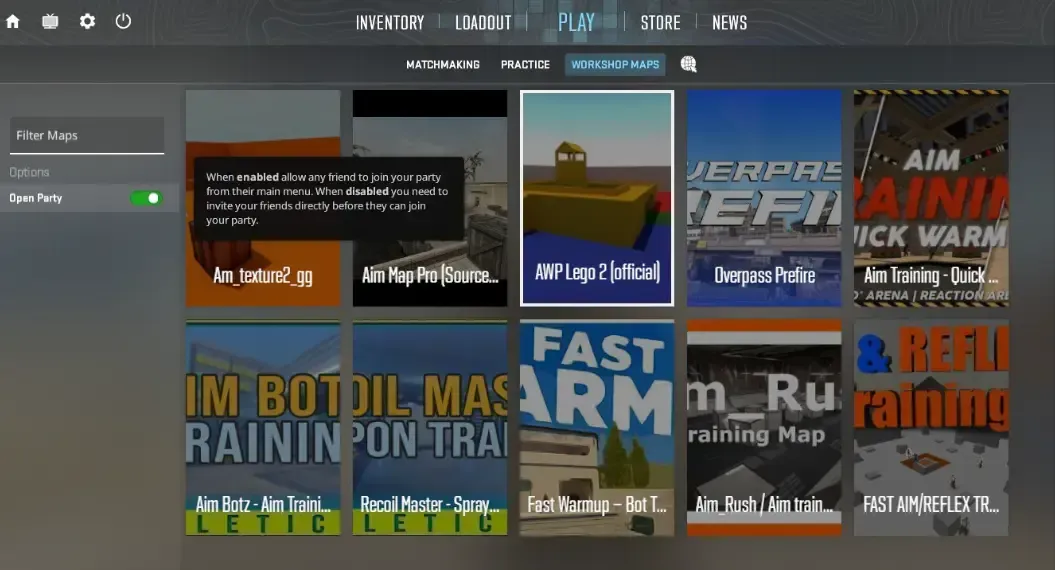
The simplest option is to invite your friends through the CS2 lobby. Open the friends list, send out the invites, and wait for everyone to join. Once they are all in, select the workshop map and launch the game.
Friends who are online but are not in CS2 can be invited directly from Steam. Press Shift + Tab, find them in your friends list, then right-click their name and send the invite.
You can also leave your lobby open to friends using the toggle button on the left. They can hop in themselves, and you can launch the map once everyone is there.
If that still does not work for someone, there is another way to get them in, and that’s by using the console directly.
The Console Method
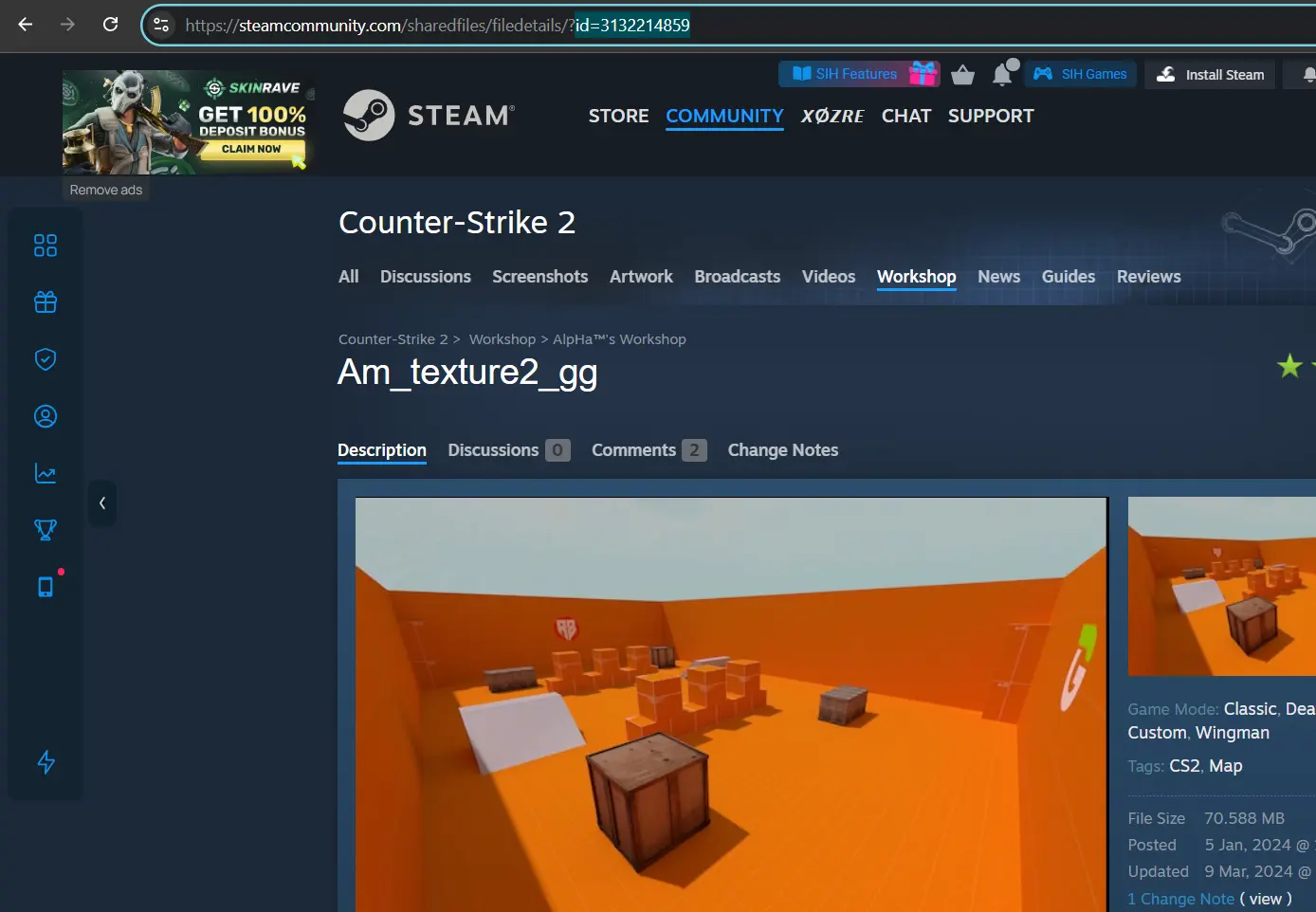
Sometimes the normal invite just does not work. In that case, the console gives you another way to get the map running with your friends. Find the workshop map ID first, then you can get the connection details once you are in.
- Find your workshop map ID on the Steam Workshop. It is the number at the end of the map's URL.
- Open the CS2 console and enter the map command. Type map_workshop followed by the map ID, then press Tab so CS2 fills in the map name.
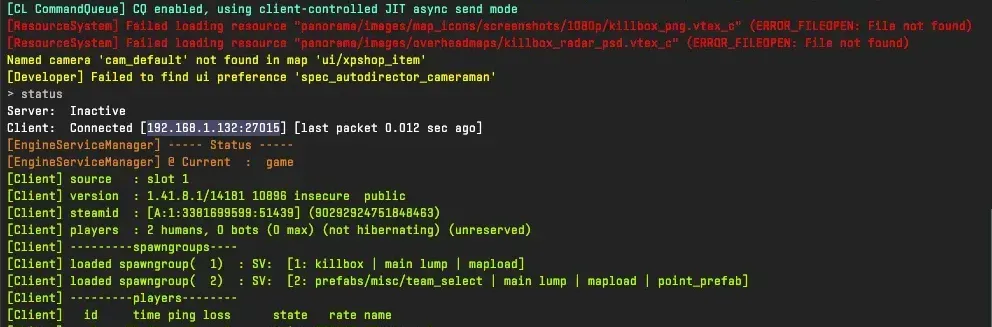
- Once you are in the map, open the console again and type “status”. This will show the server information you need to connect your friend. You'll need the Server IP address, which is written at the very top.
- Send the connection details (IP) to your friend. They can open their console and use the connect command with the address.
For example: connect ID_ADDRESS:PORT.
Note: If your CS2 console is not opening, make sure to check our helpful guide to fix it in no time.
Using SteamCMD (The Hardest Way)
SteamCMD lets you set up your own dedicated CS2 server. There is a bit more work involved before you can actually use it, but once the server is ready, you have more freedom with how you want to run your games. You can change the server settings, use your own map rotation, and keep the server running without having CS2 open on your PC. Your friends can then use the server IP to join whenever you want to play.
Best Workshop Maps to Play with Friends in CS2
Once you and your friends are all set up, the only thing left is to choose the actual map you want. And trust us when we say that there is no shortage of different maps or game modes you can choose from. Here are some fun CS2 maps to play with friends, which are widely recognized by the community:
- Aim Botz - One of the best CS2 warm-up workshop maps where you can practice your aim with different weapons against bots.
- Aim_map_pro – A simple 1v1 workshop map in CS2 for practicing aim and dueling. You can use it for warm-up or to settle debates to see who gets the bragging rights.
- AWP LEGO 2 – As the name implies, this map is one of the closest things to an AWPer’s heaven. This AWP workshop map gives you plenty of room to work on all aspects of the AWP, including duels with quickscopes and no scopes.
- Surf_utopia_njv – A fun and easy option if you’re into surfing. Besides just racing your friends through the map, it also helps you improve your movement.
- Mirage | 30+ Easy Smokes Guide - One of the best smoke workshop maps in CS2, where you can learn all the smokes for the most popular map, Mirage. You can also easily find CS2 utility maps for nades, flashes, and so on.
- crashz' Crosshair Generator v4 - If you want a pro player's crosshair, this CS2 crosshair workshop map is for you. It features dozens of crosshairs used by popular CS2 pros, and you can equip one simply by shooting at it. Most also have aim training sections where you can test each crosshair.
Conclusion
Some of the Counter-Strike 2 workshop maps you find might be completely new to you, while others could be maps you have not seen since CS 1.6. That is probably one of the better things about the CS Workshop. You can jump between old favourites and newer maps without having to stick to one type of game. There is enough there to keep you looking for a while.
Frequently asked questions
Are CS2 workshop maps free?
Yes. Most of the Community-made CS2 maps here are free in Steam Workshop. Find the map, click Subscribe, and it will be added to your Workshop Maps list.
Why can't I play workshop maps in CS2?
The problem might be the map itself, especially if it has not been updated in a while. It could also be a bad download. Check that you are subscribed, restart the game, and give it another try. If CS2 is still refusing to load it, verify the game files through Steam settings.
How to connect to my friend's workshop map?
Get your friend's IP while he's in the map, then open the developer console and type:
connect ID_ADDRESS:PORT
Do my friends need to download the map from the workshop before joining?
No. They can join without having the map already installed. The game will download it when they connect.