How To Set A Clan Tag In CS2
Clan Tags are finally in Counter-Strike 2. Valve just added the feature in the September 22, 2026 update, allowing now players who belong to Steam Community Groups to display their group’s tag next to their name in-game.
The system still uses Steam Community Groups as in CS:GO, so you can’t simply type any tag you want directly into CS2. You need to join an existing Steam group or create your own first, then select its tag from your Player Profile.
In this guide, we’ll go over everything you need to know about Clan Tags in CS2, including how to set one, create your own, change or remove it.
How To Set a CS2 Clan Tag
Setting a Clan Tag is very easy and only takes a couple of steps:
- Join a Steam Group
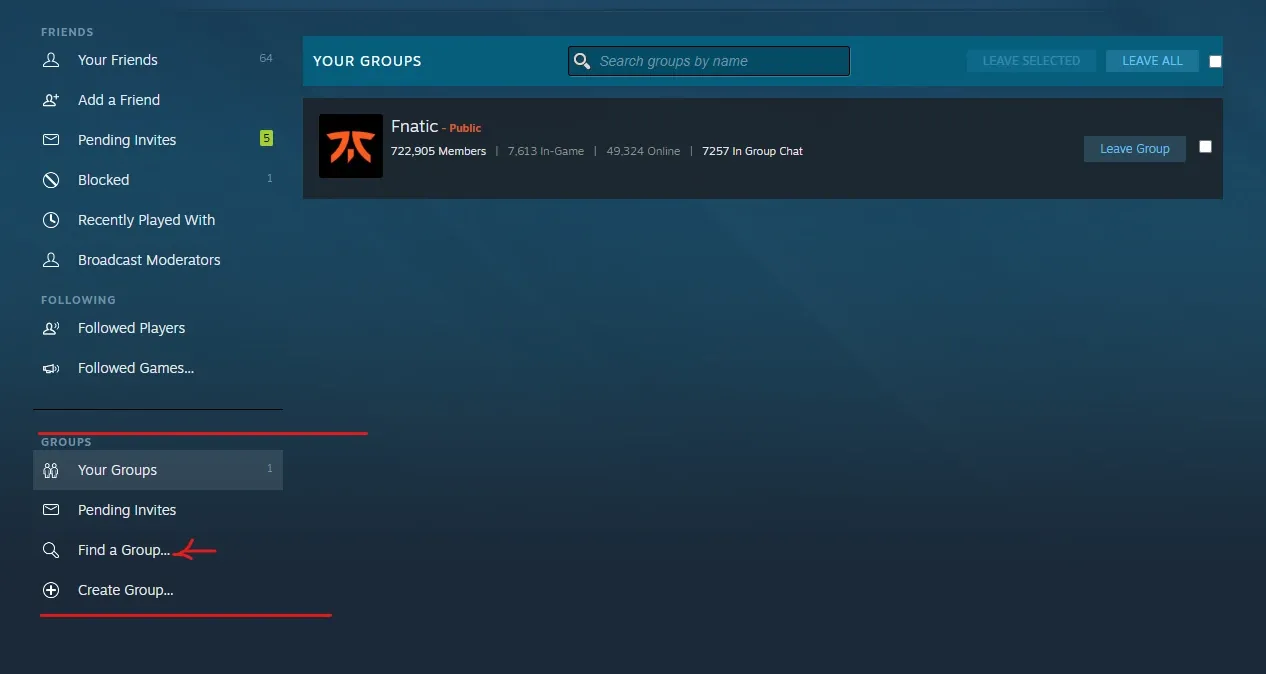
First, your Steam account needs to be part of the Steam Community Group whose tag you want to use. It doesn’t have to be a CS2-specific clan; any eligible group you belong to can appear in the Clan Tag selector.
To find a new one, open your Steam profile, go to Groups, and select the Find a Group option from the left side. From there, you can search for an existing group join. Or even create your own if you want a custom tag.
The group’s abbreviation, shown next to its full name on Steam, is what will be used as the Clan Tag in CS2.
- Open CS2
Once you have joined the Steam Group, launch Counter-Strike 2. You do not need to enter a match or change anything in the console.
- Open Your Player Profile
From the CS2 main menu, click on your profile/player icon at the bottom of the screen. You should now see the new Clan Tag option, it looks like two closed brackets.
- Select Your Clan Tag
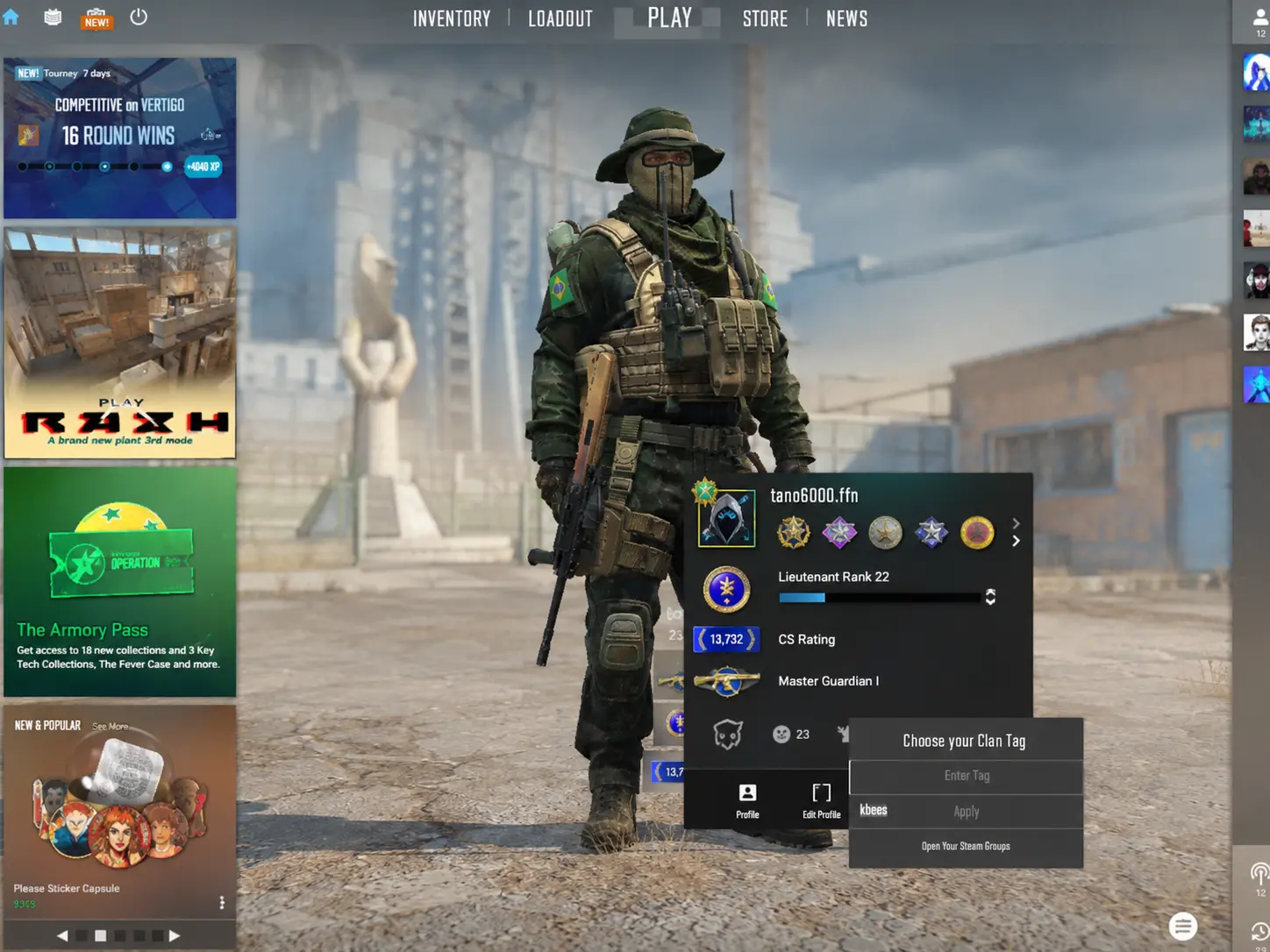
Click on Clan Tag and CS2 will show the Steam Groups you are eligible to represent. There select the group you want.
Your chosen Clan Tag will then appear next to your name in-game. Valve specifically states that players can select one of their Steam Groups through their player profile and have its clan tag displayed alongside their name. So go on for that Astralis tag and feel like an actual OG.
How To Create Your Own Clan Tag
If you want a completely custom tag rather than joining someone else’s group, you can create your own: https://steamcommunity.com/actions/GroupCreate
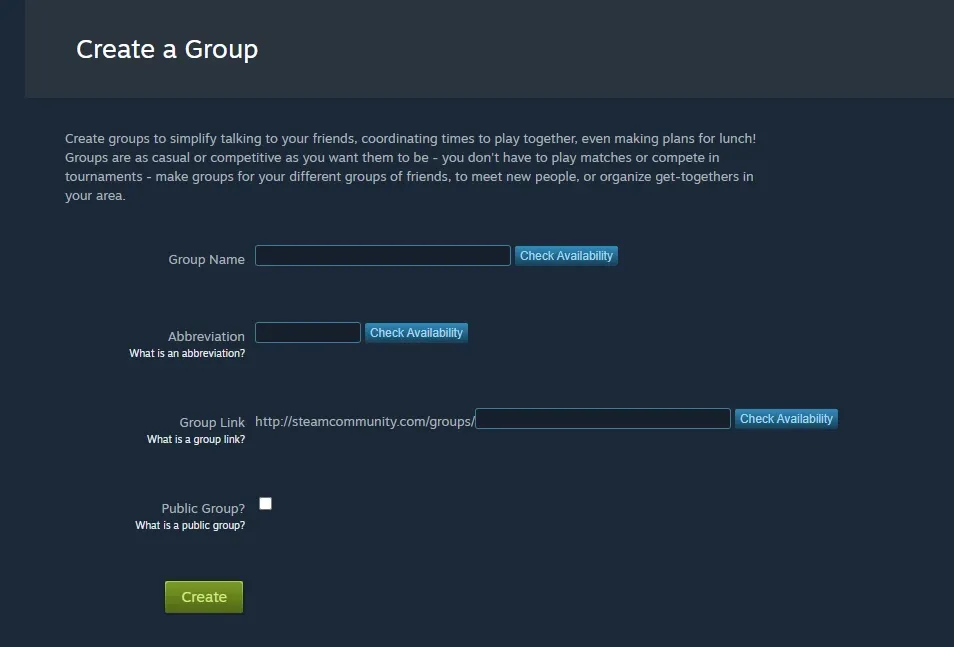
During the creation process, you can enter:
- Group name (the full name of your community)
- Abbreviation (the short version used as the Clan Tag
- Group URL
- Privacy settings
Once you have created the group, return to CS2 and select the group through Profile and then Clan Tag. Overall, steam’s group system has long used the group’s abbreviation as its tag.
How to Change Your Clan Tag
Changing your tag is just as simple: open CS2, go to your Player Profile, and select Clan Tag using the small brackets icon.
You can then choose a different Steam Group from the available options or if you want to stop displaying a tag altogether, use the Clan Tag menu and select the option to have no tag displayed.
Note: If a group you just joined doesn’t appear, restart CS2 and Steam and check again.
Final Thoughts
There you have it, after nearly three years of absence, Clan Tags are part of the game again. The system is much simpler than it might initially seem, because basically you have to be in a group and select it from your CS2 profile.
There are players who won’t mind this update, but there are those who enjoy every single bit of it, because after all it's the details that matter, and players who transitioned to CS2 from CSGO, are most definitely happy with the decision to bring back the Clan Tags.
FAQs
Can I create a custom Clan Tag in CS2?
Yes , you can create a custom tag in CS2 by creating a community group and use its abbreviation as your clan tag.
Does a Clan Tag give me any gameplay benefits?
No. These tags are purely cosmetic. They could make you feel like a pro player playing for Astralis or NIP , but they just identify you as a member of a group and do not affect matchmaking, gameplay or ranks.